Use Ethers.js InfuraProvider or Web3Provider
In this tutorial, you'll create a simple React app to show the differences between using the
Ethers.js library's InfuraProvider and Web3Provider methods to send a transaction.
The key difference is that with Web3Provider, you can load the private key from a web3 wallet
(for example, MetaMask), while InfuraProvider needs a wallet created locally with a stored private key.
This tutorial uses the Sepolia testnet.
Prerequisites
- Install MetaMask and create an Ethereum account for testing purposes.
- Load Sepolia ETH into your wallet from the MetaMask faucet.
- Node.js and npm installed.
You can run the following to confirm that Node and npm are installed:
node -v && npm -v
This tutorial was tested using ethers v5.7.2 and Node.js v16.17.0.
Steps
1. Create the React app
In the terminal, run the following command to create an app called my-app:
npx create-react-app my-app
Change into the project directory:
cd my-app
2. Install ethers.js
Install ethers.js in the project directory.
npm install --save ethers
3. Create the environment variables
Create a .env file in your project directory to store the project and Ethereum account details.
REACT_APP_API_KEY="<YOUR-API-KEY>"
REACT_APP_PRIVATE_KEY="<PRIVATE-KEY>"
Ensure you replace the following values in the .env file:
<YOUR-API-KEY>with the API key of the Ethereum project.<PRIVATE-KEY>with the private key of your Ethereum account.
Never disclose your private key. Anyone with your private keys can steal any assets held in your account.
4. Build the app
Import dependencies and create providers
Import the required dependencies and create the providers for communicating with the blockchain.
In the src directory open the App.js file. Remove the existing code and add the following code:
import React, { useState } from "react"
import "./App.css"

function App() {
  const ethers = require("ethers")
  const API_KEY = process.env.REACT_APP_API_KEY
  const PRIVATE_KEY = process.env.REACT_APP_PRIVATE_KEY
  const provider_Metamask = new ethers.providers.Web3Provider(window.ethereum)
  const infuraProvider = new ethers.providers.InfuraProvider("sepolia", API_KEY)
}
export default App
Maintain the app state
Next, use the useState hook function to maintain the state of the app. Add the following code below the const declarations (inside the App() declaration):
// Use the useState hook function to add state variables to a functional component.
const [blockNumber, setBlockNumber] = useState(null)
const [txSent, setTxSent] = useState(null)
const [txSentInfura, setTxSentInfura] = useState(null)
Create the app frontend
Next, create the app front-end that includes two forms for sending the transactions, and buttons for each provider to fetch the latest block number.
// Configure the app frontend
return (
  <div className="App">
    <header className="App-header">
      <h3> Press one of the buttons to find out the latest block number: </h3>
      <div>
        <button onClick={handleButton1}>InfuraProvider</button>
        <button onClick={handleButton2}>Web3Provider</button>
        <p>{blockNumber}</p>
      </div>
      <h3> Fill out the form to send a transaction via Web3Provider: </h3>
      <div>
        <form onSubmit={handleSubmitWeb3}>
          <input type="text" name="address" placeholder="Recipient Address" />
          <input type="text" name="amount" placeholder="Amount (ETH)" />
          <input type="submit" value="Send w/ Web3Provider" />
        </form>
        <p>{txSent}</p>
      </div>
      <h3> Fill out the form to send a transaction via InfuraProvider: </h3>
      <div>
        <form onSubmit={handleSubmitInfura}>
          <input type="text" name="address" placeholder="Recipient Address" />
          <input type="text" name="amount" placeholder="Amount (ETH)" />
          <input type="submit" value="Send w/ InfuraProvider" />
        </form>
        <p>{txSentInfura}</p>
      </div>
    </header>
  </div>
)
Retrieve the latest block number
Create the code to retrieve the latest block number. Add the following code above the return statement.
// Get the latest block using the InfuraProvider or wallet
const handleButton1 = async () => {
  const latest_block = await infuraProvider.getBlockNumber("latest")
  setBlockNumber(latest_block)
}

const handleButton2 = async () => {
  const latest_block = await provider_Metamask.getBlockNumber("latest")
  setBlockNumber(latest_block)
}
Send the transaction
To send the transaction, you need the target address and the amount to send. Add the following code below the code that retrieves the latest block number.
// Handle the form submissions to send the transactions
const handleSubmitWeb3 = async (e) => {
  e.preventDefault()
  const data = new FormData(e.target)
  const address = data.get("address")
  const amount = data.get("amount")
  sendTransaction(address, amount)
}

const handleSubmitInfura = async (e) => {
  e.preventDefault()
  const data = new FormData(e.target)
  const address = data.get("address")
  const amount = data.get("amount")
  const signer = new ethers.Wallet(PRIVATE_KEY, infuraProvider)
  sendTransaction(address, amount, signer)
}
Next, create the sendTransaction() function that sends the transaction. Place the following code below the two handleSubmit methods.
  // Send the transaction using either the Web3Provider or InfuraProvider
  const sendTransaction = async (address, amount, signer=null) => {
    if (signer==null){ // Web3 Provider
      if (!window.ethereum)
        console.error("No wallet found!");
      else {
        await window.ethereum.send("eth_requestAccounts");
        const provider = new ethers.providers.Web3Provider(window.ethereum);
        const signer = provider.getSigner();
        const tx = await signer.sendTransaction({
          to: address,
          value: ethers.utils.parseEther(amount)
        });
        console.log("tx", tx);
        setTxSent("Transaction initiated! Tx hash: " + tx.hash);
      }
    }
    else // InfuraProvider
    {
      const tx = await signer.sendTransaction({
        to: address,
        value: ethers.utils.parseEther(amount)
      });
      console.log("tx", tx);
      setTxSentInfura("Transaction initiated! Tx hash: " + tx.hash);
    }
  }
5. Run the app
Run the app from the root of the directory:
npm start
If you are using Create React App version >=5 you may run into issues building, such as:
Module not found: Error: Can't resolve 'crypto' in 'C:\Users\Username\Projects\testProject\client\node_modules\eth-lib\lib'

BREAKING CHANGE: webpack < 5 used to include polyfills for node.js core modules by default.
This is no longer the case. Verify if you need this module and configure a polyfill for it.
This is because Node.js polyfills are not included in the latest version of Create React App.
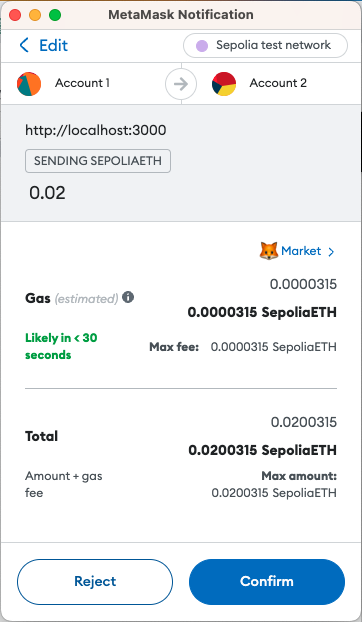
In the app, notice that when you try and send a transaction using Web3Provider, the app opens a MetaMask instance to transfer your funds.
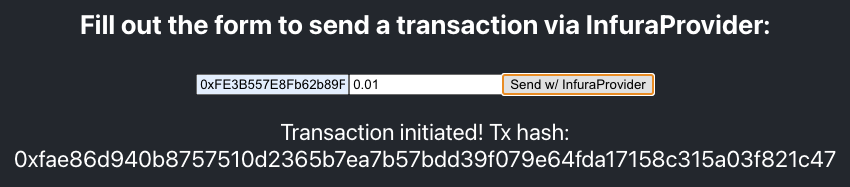
If you transfer funds using the InfuraProvider, then the funds are transferred directly from your app.
Complete code sample
The complete code sample looks like this:
import React, { useState } from "react"
import "./App.css"

function App() {
  const ethers = require("ethers")
  const API_KEY = process.env.REACT_APP_API_KEY
  const PRIVATE_KEY = process.env.REACT_APP_PRIVATE_KEY
  const provider_Metamask = new ethers.providers.Web3Provider(window.ethereum)
  const infuraProvider = new ethers.providers.InfuraProvider("mainnet", API_KEY)

  // Use the useState hook function to add state variables to a functional component.
  const [blockNumber, setBlockNumber] = useState(null)
  const [txSent, setTxSent] = useState(null)
  const [txSentInfura, setTxSentInfura] = useState(null)

  // Get the latest block using the InfuraProvider or wallet
  const handleButton1 = async () => {
    const latest_block = await infuraProvider.getBlockNumber("latest")
    setBlockNumber(latest_block)
  }

  const handleButton2 = async () => {
    const latest_block = await provider_Metamask.getBlockNumber("latest")
    setBlockNumber(latest_block)
  }

  // Handle the form submissions to send the transactions
  const handleSubmitWeb3 = async (e) => {
    e.preventDefault()
    const data = new FormData(e.target)
    const address = data.get("address")
    const amount = data.get("amount")
    sendTransaction(address, amount)
  }

  const handleSubmitInfura = async (e) => {
    e.preventDefault()
    const data = new FormData(e.target)
    const address = data.get("address")
    const amount = data.get("amount")
    const signer = new ethers.Wallet(PRIVATE_KEY, infuraProvider)
    sendTransaction(address, amount, signer)
  }

  // Send the transaction using either the Web3Provider or InfuraProvider
  const sendTransaction = async (address, amount, signer = null) => {
    if (signer == null) {
      // Web3 Provider
      if (!window.ethereum) console.error("No wallet found!")
      else {
        await window.ethereum.send("eth_requestAccounts")
        const provider = new ethers.providers.Web3Provider(window.ethereum)
        const signer = provider.getSigner()
        const tx = await signer.sendTransaction({
          to: address,
          value: ethers.utils.parseEther(amount),
        })
        console.log("tx", tx)
        setTxSent("Transaction initiated! Tx hash: " + tx.hash)
      }
    } // InfuraProvider
    else {
      const tx = await signer.sendTransaction({
        to: address,
        value: ethers.utils.parseEther(amount),
      })
      console.log("tx", tx)
      setTxSentInfura("Transaction initiated! Tx hash: " + tx.hash)
    }
  }

  // Configure the app frontend
  return (
    <div className="App">
      <header className="App-header">
        <h3> Press one of the buttons to find out the latest block number: </h3>
        <div>
          <button onClick={handleButton1}>InfuraProvider</button>
          <button onClick={handleButton2}>Web3Provider</button>
          <p>{blockNumber}</p>
        </div>
        <h3> Fill out the form to send a transaction via Web3Provider: </h3>
        <div>
          <form onSubmit={handleSubmitWeb3}>
            <input type="text" name="address" placeholder="Recipient Address" />
            <input type="text" name="amount" placeholder="Amount (ETH)" />
            <input type="submit" value="Send w/ Web3Provider" />
          </form>
          <p>{txSent}</p>
        </div>
        <h3> Fill out the form to send a transaction via InfuraProvider: </h3>
        <div>
          <form onSubmit={handleSubmitInfura}>
            <input type="text" name="address" placeholder="Recipient Address" />
            <input type="text" name="amount" placeholder="Amount (ETH)" />
            <input type="submit" value="Send w/ InfuraProvider" />
          </form>
          <p>{txSentInfura}</p>
        </div>
      </header>
    </div>
  )
}

export default App